
Project Initialization & Guardrails
After installing the global configuration, the recommended first step whenever entering a specific code repository is running /project init.
Why is /project init Essential?
OpenCode is a production-grade engineering system. Global configuration alone cannot understand a specific repository's architecture topology or governance rules. Running /project init scaffolds localized code intelligence and project guardrails:
┌─────────────────────────────────────────────────────────────┐
│                 /project init Workflow                       │
│                                                             │
│  1. Detect project language & structure                     │
│  2. Build local code knowledge graph (CodeGraph / Serena)   │
│  3. Scaffold .opencode/ governance rules & ADR directory     │
│  4. Open interactive Project Wizard dialog                  │
└─────────────────────────────────────────────────────────────┘
Core Capabilities Scaffolding
1. Local Code Knowledge Graph
- Precision AST Analysis: Detects project tech stack and builds code graph indices;
- Zero Token Waste: Instead of blind full-text grep across dozens of files, Serena LSP and CodeGraph provide multi-hop call graphs and blast-radius impact analysis in milliseconds.
2. Project Engineering Guardrails
Generates a lightweight .opencode/ structure in the project root:
- ADR Architecture Decision Records (
docs/adr/): Enforces documented architectural decisions; - Spec-Driven Development (
docs/specs/): Scaffolds top-down requirement specifications; - Secret File Guard: Activates
env-guardto prevent.envfiles or API tokens from being read into context or committed to Git.
3. Interactive Project Wizard
An interactive TUI dialog prompts you to configure per-project switches using arrow keys:
| Guardrail Switch | Purpose | Recommended For |
|---|---|---|
| ADR Guard | Blocks unapproved architectural drift | Medium/large systems, core backend |
| Env Guard | Prevents secret and .env credential leaks | Projects with production credentials |
| E2E Guard | Requires passing E2E verification before delivery | Projects with automated test suites |
| Project Manager | Enforces commit discipline & SDD loop | Team collaboration, trunk-based dev |
Hands-on Workflow
Launch opencode in any project root and run /project init:
bash
# 1. Start OpenCode
opencode

# 2. Run project initialization
> /project init
OpenCode will report indexing progress and prompt the Project Wizard Interactive Dialog:
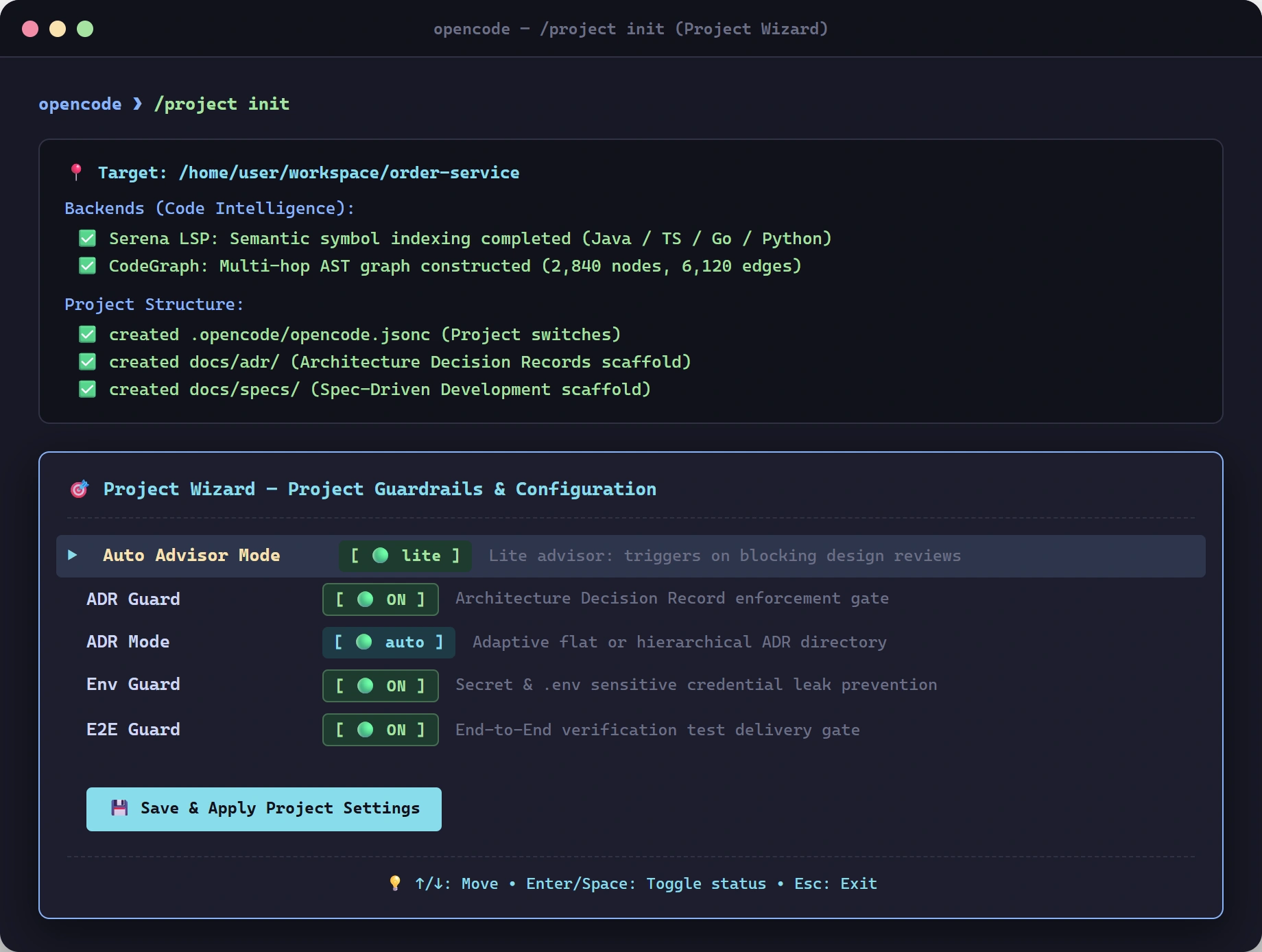
💡 Keyboard Guide:
↑/↓Navigate between guardrail optionsSpaceorEnterToggle status (🟢 ON/🔴 OFF/⚪ default)- Select
💾 Save & Apply Project Settingsto persist switches into local.opencode/opencode.jsonc.
Next Steps
- Learn daily development modes: Daily Use & Modes
- Explore model profile presets: Configuration & Profiles
- Explore workflow slash commands: Workflow Slash Commands